International Students
International student employees significantly enrich campus workplaces by fostering inclusive environments and bringing diverse global perspectives that enhance cross-cultural collaboration.
Eligibility
To be eligible for student employment at Santa Clara University, you must:
- Be a matriculating (degree-seeking) student enrolled at SCU
- Be registered for classes and have completed your hiring paperwork
- Be enrolled in at least six units during the academic term
- Maintain a minimum 2.0 cumulative GPA
- Have proper authorization to work in the U.S.
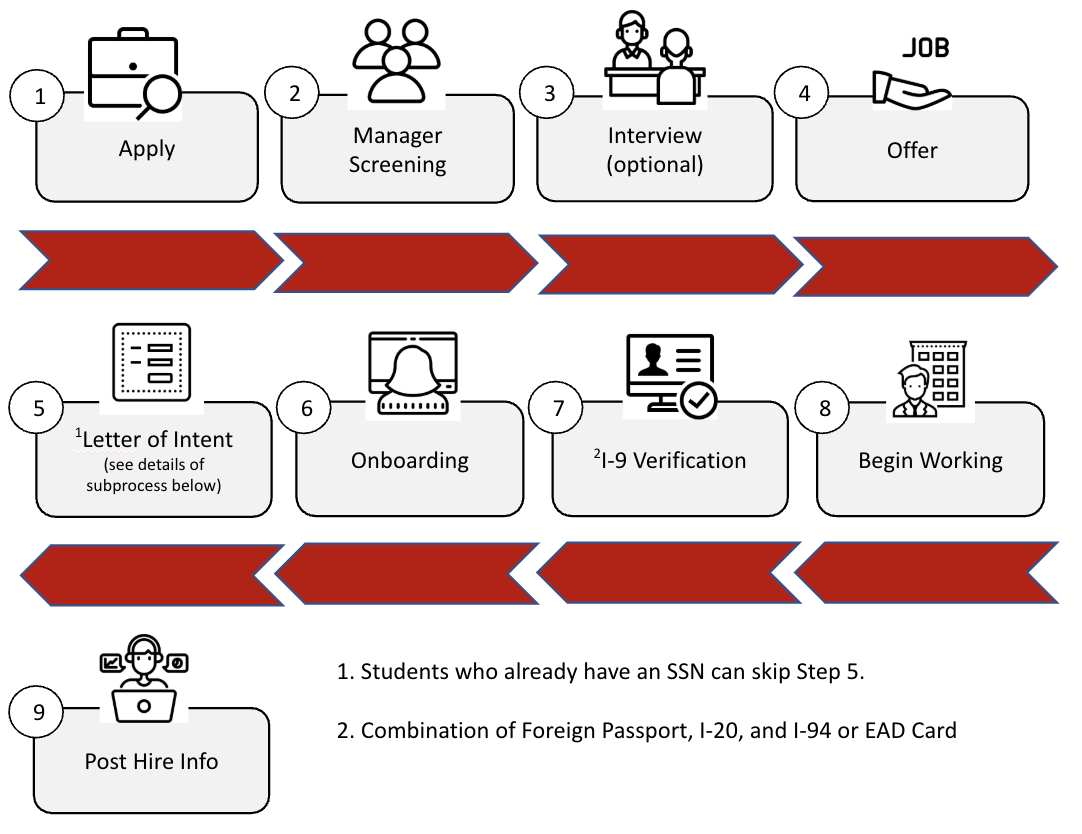
Step 1: Apply
All student job available opportunities are posted in Workday, under the Career app.
After carefully reviewing the job posting descriptions, you can apply to the positions you meet the minimum qualifications for on the SCU Students Job Site.
Step 2: Screening
This step is part of the recruiting process and it's completed by the hiring managers.
The hiring manager will review the job applicants and contact the student job applicants who they will like to consider for the next step in the recruiting process. Depending on the job and the number of applicants, this step may take some time.
Step 3: Interview (optional)
The interview step is not required by it's highly recommended.
Hiring managers will contact the student job candidates they would like to invite for an interview. Student job applicants are encouraged to visit the Career Center for Interview tips.
Step 4: Offer
This step is completed by the hiring manager.
Hiring managers will extend a job offer to the selected candidate.
Step 5: Request a Letter of Intent to Hire
This step applies only to international students who don't already have a valid U.S Social Security Number. International students who already have a U.S. Social Security number can skip to step 7 of the hiring process.
Please request a Letter of Intent to Hire" from your hiring manager/department and email it to iss@scu.edu for a Social Security Number Request. Below is a diagram of the overall process.
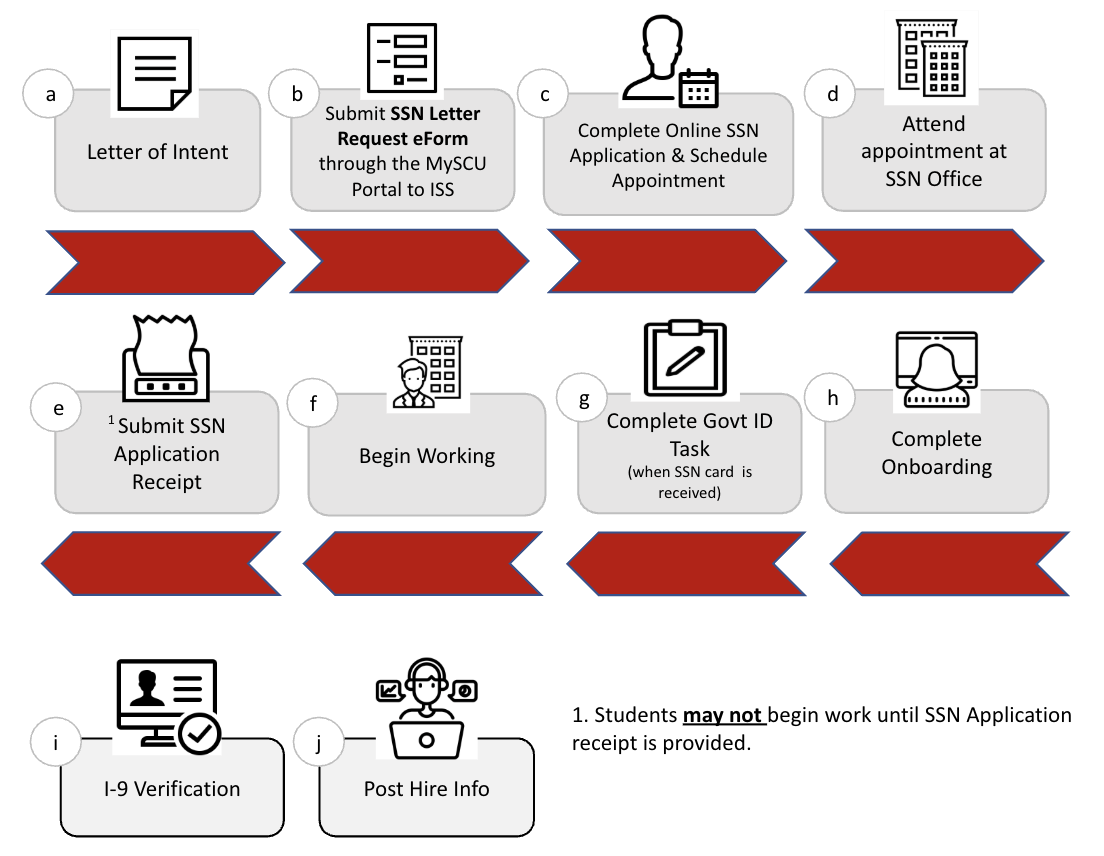
Step 6: Appointment with Social Security Office
This step applies only to international students who don't already have a valid U.S Social Security Number. International students who already have a U.S. Social Security number can skip to step 7 of the hiring process.
While you wait for your appointment with the Social Security Office, you cannot begin working.
Once you go to the appointment and receive your Social Security Application receipt from the Social Security Office, email a copy to studentemployment@scu.edu. You can begin working at this time. Keep track of your hours worked so that you can enter them in Workday.
As soon as you receive your Social Security Number complete the Edit Government Id task in Workday and complete all onboarding steps described below.
Step 7: Student Hire Onboarding
Once hired in Workday, student employees are required to complete a series of important documents & tasks in Workday. You must complete all of these steps to begin working. Please check your @scu email frequently to make sure you don't miss any important information.
Step 1: Edit Govt ID (only if you don't have an SSN). If you are applying for an SSN you will need to complete this step first before you can see and complete the rest of the onboarding steps.
Step 2: Complete Federal Withholding Elections
Step 3: State and Local Withholding Elections
Step 4: Manage Payment Elections (bank direct deposit)
Step 5: Change Emergency Contact
Step 6: Review and Acknowledge the Student Employment Agreement
Step 7: Review and E-Sign Employee Notice (Notice under Cal. Lab. Code 2810.5)
I-9 Section One: Employee Information and Attestation (completed by student employee)
Step 8: I-9 Verification
I-9 Section Two: Employer Review and Verification.
- Foreign Passport
- I-94
- I-20
Step 9: Begin Working
Students may begin working only after all of the required onboarding steps, including the I-9 verification, have been fully completed and approved by Human Resources. Once this process is finalized and all required documentation has been reviewed, students are cleared to start their employment duties.
Step 10: Post-Hire General Information
Once all required onboarding steps are completed, you may start working and reporting hours worked.
Student employees are also responsible for communicating with their supervisor(s) proactively about schedule changes, conflicts, or academic workload and to inform them if you are no longer able to work.
Additional information:
- Students who exceed the 19-hour weekly hour limit repeatedly may lose eligibility to work as a student employee the following quarter. The 19 limit includes all combined additional jobs.
- Students may work up to 40 hours during academic breaks and summer.
Please review the following sections after you are hired and have completed the onboarding steps listed above. This information is helpful and will support a smoother start in your student worker position.
Time and Pay Information
Student employees are responsible for accurately recording their work hours and submitting timesheets on time according to the payroll schedule.
- You cannot enter time in Workday until you have your I-9 employment documents verified, including your social security number.
- Enter time in Workday on the days worked to ensure prompt payment.
- Submit hours in Workday on timesheet due dates.
- If you miss submitting your time, you can enter it for the previous pay period once timesheets open again; however, those hours will be paid in the next pay cycle.
- If you hold multiple positions, make sure to choose the correct one when logging your time so it’s routed to the appropriate supervisor for approval.